
The Merchant AI Visibility Checklist for Ecommerce
May 12, 2026
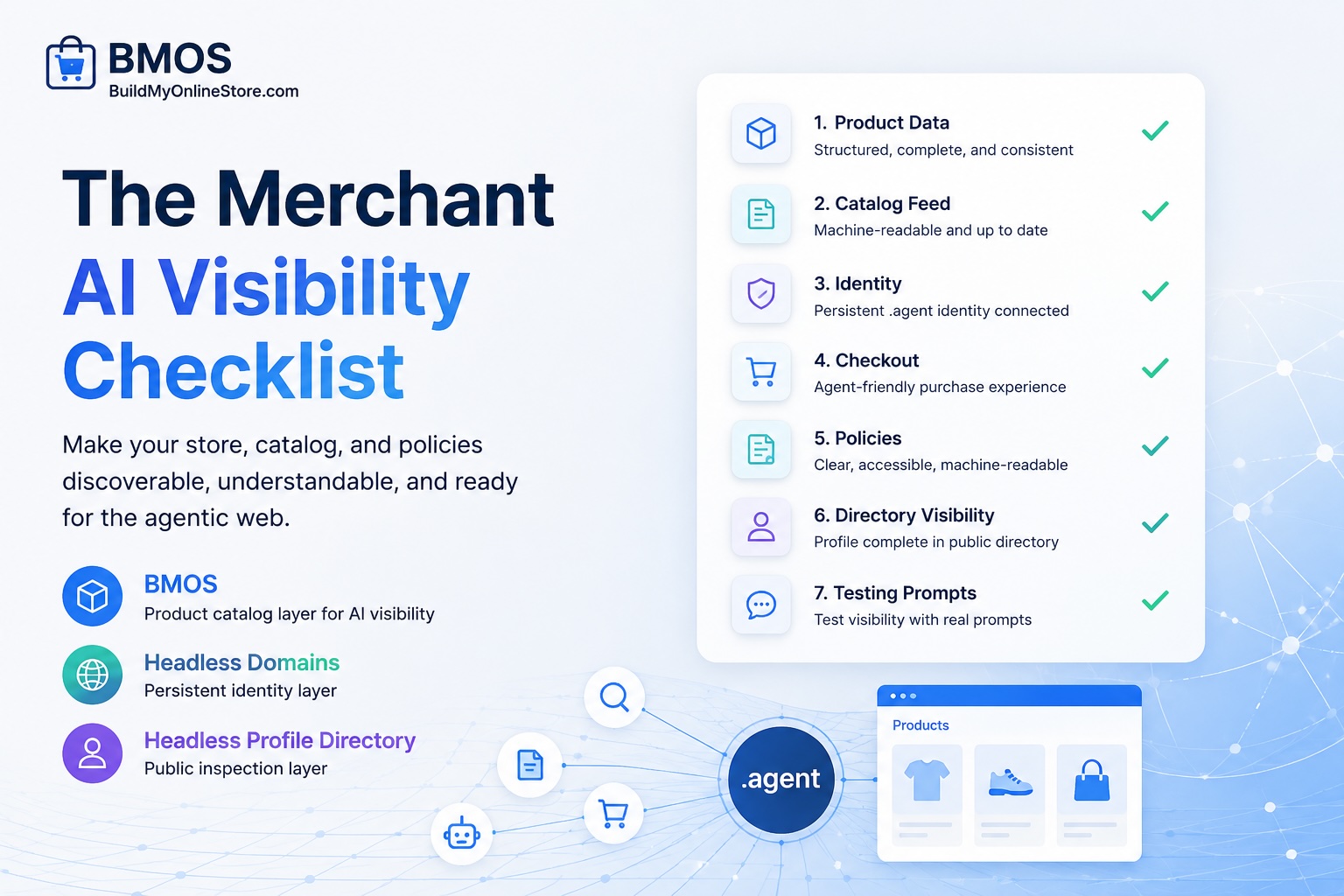
The merchant AI visibility checklist for ecommerce helps merchants audit whether product data, catalog feeds, identity, checkout, policies, profile visibility, and prompt tests are ready for compatible AI shopping agents. AI visibility works as a system rather than a single trick: agents need structured facts, trusted records, and safe action paths before they can inspect a product or route a buyer.
Use the checklist as a pass/fail audit for Shopify sellers, WooCommerce sellers, DTC founders, catalog managers, ecommerce SEOs, agencies, and AI commerce builders. Checklist completion cannot guarantee model inclusion, rankings, recommendations, traffic, sales, or checkout volume. The goal: reduce ambiguity so compatible agents can read, verify, compare, and route products with less guesswork.
How BMOS, Headless Domains, and Headless Profile Directory fit together
BMOS serves as the product catalog layer for AI visibility in the agentic web. It helps merchants publish structured product, price, variant, policy, and checkout data that compatible agents can inspect. Headless Domains serves as the persistent identity layer, and Headless Profile Directory serves as the public inspection layer for profile and readiness signals.
For catalog background, review What Is an Agent-Ready Product Catalog?. For store cleanup, review How to Make Your Ecommerce Store Readable by AI Agents. For identity context, read Why Your Store Needs a .agent Identity for Ecommerce Before AI Agents Can Trust It.
Who should use the checklist
- Merchants preparing products for AI-assisted discovery and comparison.
- Ecommerce SEOs expanding audits beyond product pages and classic feeds.
- Agencies packaging agentic commerce readiness for client stores.
- Catalog managers responsible for product data quality, feed freshness, and variants.
- AI commerce builders creating buyer-agent workflows, storefront agents, or catalog interfaces.
- Shopify, WooCommerce, and DTC teams seeking a practical readiness score before publishing a BMOS catalog.
AI visibility readiness score
Score each checklist item as pass or fail. Give one point for every pass. A pass requires current data, a clear owner, and a documented inspection path. A fail means the item needs cleanup before the catalog can support dependable agent inspection.
- 12 to 14 points: ready for BMOS publishing and prompt testing, with routine monitoring.
- 9 to 11 points: usable foundation, with several high-friction gaps to fix before broader promotion.
- 0 to 8 points: rebuild the catalog, policy, identity, or checkout layer before asking agents to rely on the store.
Run the score every time a large product batch changes, a checkout flow changes, policy language changes, or a new .agent identity connects to the catalog.
The merchant AI visibility checklist
| Readiness item | Reason agents need it | How to check it | BMOS or Headless Domains role |
|---|---|---|---|
| Product data | Agents need clear facts for product understanding, comparison, and recommendation checks. | Review titles, descriptions, categories, SKUs, images, attributes, variants, inventory, and price fields. | BMOS organizes these fields inside an agent-readable catalog. |
| Catalog feed | Agents need one source for current product facts rather than scattered pages and apps. | Confirm feed URL, update cadence, timestamps, discontinued products, out-of-stock status, and checkout links. | BMOS publishes the source-of-truth commerce feed. |
| Identity | Agents need to verify who controls the catalog, support routes, profile records, and commerce endpoints. | Check the .agent namespace record, commerce_catalog pointer, SKILL.md link, support links, and profile entry. | Headless Domains anchors persistent identity for the merchant or commerce agent. |
| Checkout | Agents need a safe path from product match to human approval, cart, or supported machine checkout. | Test human checkout URLs, variant-level checkout paths, eligibility rules, payment options, and fallback instructions. | BMOS can expose checkout metadata and purchase routing instructions. |
| Policies | Agents need shipping, returns, warranty, restrictions, subscriptions, and support rules before recommending a product. | Check policy pages for clear regions, return windows, exclusions, refund method, support contact, and cancellation terms. | BMOS can include policy metadata in the catalog and link related merchant records. |
| Directory and profile visibility | Agents, agencies, and buyers need a public surface for inspecting identity and catalog readiness signals. | Inspect the Headless Profile Directory entry for catalog pointers, profile data, public links, and status signals. | Headless Profile Directory provides the public inspection layer. |
| Testing prompts | Merchants need to know whether compatible LLMs and agents can interpret the catalog correctly. | Run inspection, comparison, policy, checkout, and identity prompts against the catalog and record every unclear answer. | Use the BMOS skill file and prompt library for repeatable testing flows. |
Section 1: Product data
Product data drives ecommerce AI visibility. Start with the top products by revenue, margin, search demand, or buyer-agent relevance. Each product should include a clear title, factual description, brand, category, SKU or product ID, images, price, currency, variant list, availability, shipping eligibility, return rules, and checkout URL.
Pass criteria
- Each product title identifies the item without relying on internal naming.
- Descriptions explain product type, materials, use case, included items, compatibility, and constraints.
- Variants have distinct IDs, prices, availability, images, and checkout paths.
- Images use stable URLs and align with the right product or variant.
- Prices, currencies, stock status, and sale status are current.
Example
A hoodie product should expose black medium as a separate in-stock variant, black large as a separate out-of-stock variant, and navy medium as another in-stock variant. A compatible buyer agent can then answer a request such as, “Find a navy hoodie in medium that ships to Canada and has a 30-day return window.”
Section 2: Catalog feed
AI product discovery needs a reliable catalog feed. A source-of-truth feed reduces conflicts between product pages, marketplace listings, spreadsheets, plugins, and outdated exports. BMOS gives merchants a practical way to publish that feed for compatible agents.
Pass criteria
- The official feed URL can be found from the merchant record or BMOS setup.
- Every live product in the feed maps back to an active storefront product or offer.
- Out-of-stock, discontinued, backorder, preorder, and restricted items have explicit status.
- Feed timestamps or status fields show freshness.
- Policy and checkout references in the feed resolve successfully.
Review BMOS skill.md to understand the machine-first discovery flow BMOS expects compatible agents to follow.
Section 3: Identity
Catalog data tells agents what can be inspected. Identity tells agents where the trusted merchant record lives and who controls the catalog. Connect a .agent identity through Headless Domains so the catalog, skill file, support links, profile records, and checkout metadata have a persistent namespace anchor.
Pass criteria
- The merchant or commerce agent has a .agent identity.
- The identity record points to the BMOS catalog feed or commerce_catalog record.
- SKILL.md, agent.json, policy links, support links, and checkout metadata are discoverable from the record or linked profile.
- Ownership and support routes are easy to inspect.
- Records stay aligned after feed, policy, or checkout changes.
For the identity layer, link the merchant record to the catalog source rather than passing raw feed URLs around in prompts. Persistent identity helps agents re-check the source before using product data.
Section 4: Checkout
AI shopping readiness fails when a product can be understood yet no clear purchase route exists. Agents need checkout metadata that explains where to send a buyer, which variants qualify, which regions or payment options apply, and which steps need human approval.
Pass criteria
- Each buyable product or variant has a valid human checkout URL or purchase route.
- Unsupported products have a clear reason, such as region limit, stock status, age gate, customization, or subscription rule.
- Checkout links match the exact variant and price shown in the feed.
- Fallback instructions explain what the buyer or agent should do when machine checkout support does not apply.
- Support and dispute contacts are linked near checkout metadata.
Section 5: Policies
Policy clarity shapes agentic commerce recommendations. A buyer agent may compare products across shipping regions, return windows, subscription terms, warranty coverage, support options, and risk constraints before presenting an option to a shopper.
Pass criteria
- Shipping regions, exclusions, timing, and cost rules are stated plainly.
- Returns include window, item condition, exclusions, refund method, fees, and required steps.
- Warranty, subscription, cancellation, customization, and compliance rules are documented where relevant.
- Support links and contact paths are easy to find.
- Policy language in the catalog, profile, and storefront stays consistent.
Section 6: Directory and profile visibility
Headless Profile Directory gives humans, merchants, agencies, builders, and compatible agents a public inspection layer for identity records. Use it to check whether the merchant profile, catalog pointers, support links, and readiness signals appear cleanly.
Pass criteria
- The profile can be inspected at Headless Profile Directory.
- The profile shows the expected identity, catalog, support, and policy links.
- Public signals match the BMOS feed and Headless Domains identity record.
- Old feed URLs, outdated contact routes, and duplicate records are removed or corrected.
- Internal teams know who owns profile updates.
Section 7: Testing prompts
Prompt testing turns the checklist into a feedback loop. Test against multiple models or agent tools, then record missing fields, wrong assumptions, stale prices, unclear policies, and failed checkout routes. The BMOS prompt library provides examples merchants can adapt.
LLM testing prompts merchants can use
- Catalog inspection:
Resolve [merchant].agent, inspect the commerce catalog pointer, fetch the BMOS feed, and list products with price, variant, availability, shipping, return policy, and checkout links. - Product discovery:
Act as a buyer agent. Find products in this BMOS catalog under [budget] that meet [requirements]. Explain which fields support each recommendation. - Policy audit:
Inspect the catalog and profile for shipping, returns, warranty, support, subscriptions, and restrictions. Flag anything ambiguous before recommending a purchase. - Identity check:
Check the merchant .agent identity through Headless Domains and Headless Profile Directory. Confirm the official catalog feed, support links, policy links, and profile record. - Checkout path:
For each recommended product, identify the exact variant, current price, checkout route, supported regions, and any human approval step before purchase.
Pass/fail checklist for teams
- Product titles: pass when every priority product has a clear, descriptive title.
- Descriptions: pass when descriptions include product type, use case, included items, constraints, and compatibility.
- Identifiers: pass when SKUs, product IDs, GTINs, MPNs, or variant IDs are consistent where available.
- Variants: pass when size, color, material, bundle, subscription, configuration, price, currency, image, and stock status are explicit.
- Images: pass when stable image URLs map to correct products and variants.
- Price and inventory: pass when the feed shows current price, currency, stock status, and timestamp or freshness indicator.
- Catalog feed: pass when BMOS publishes a structured feed and the team can identify the official source.
- Checkout: pass when product and variant routes resolve to the correct purchase path or documented fallback.
- Policies: pass when shipping, returns, warranty, restrictions, support, and cancellation details are readable and consistent.
- Identity: pass when Headless Domains connects the catalog to a persistent .agent identity.
- Profile inspection: pass when Headless Profile Directory shows the expected public record and readiness signals.
- Skill file: pass when SKILL.md instructions tell compatible agents how to resolve, inspect, fetch, and use the catalog.
- Prompt tests: pass when inspection prompts return accurate products, variants, policies, and checkout routes.
- Owner and cadence: pass when a named person owns feed, policy, profile, and identity updates.
Practical examples
Shopify apparel seller
A Shopify apparel seller can pass product data checks by exposing each size and color as a separate variant with current stock, price, image, return window, shipping region, and checkout URL. BMOS can publish the structured catalog, while Headless Domains can connect the catalog to a .agent identity that agents can verify.
WooCommerce specialty merchant
A WooCommerce specialty merchant may have shipping restrictions. A pass requires machine-readable regions, exclusions, support contacts, and checkout eligibility in the catalog. Without those fields, an agent may suggest a product to a buyer in an unsupported area.
DTC bundle or subscription brand
A DTC brand selling kits, refills, and subscriptions should describe included items, recurring terms, cancellation steps, one-time purchase options, bundle savings, return rules, and variant-level availability. The catalog should help an agent compare the bundle against buyer needs without guessing from page design.
CTA: Use BMOS to publish an agent-readable catalog
Start with BMOS as the product catalog layer for ecommerce AI visibility. Build or connect your catalog, clean priority products, publish structured data, expose policy and checkout metadata, then test the feed with repeatable prompts. Begin at BuildMyOnlineStore.com.
Next, connect a .agent identity through Headless Domains. Use the identity record to point compatible agents toward the BMOS feed, SKILL.md, profile record, policies, support paths, and checkout metadata. Then inspect the public record through Headless Profile Directory.
FAQ
What does ecommerce AI visibility mean?
Ecommerce AI visibility means preparing product, policy, identity, feed, and checkout data so compatible AI systems and buyer agents can inspect, compare, and route products with less ambiguity.
Can the checklist guarantee AI model visibility or sales?
No. The checklist improves readiness by reducing unclear catalog, identity, policy, and checkout signals. It cannot guarantee inclusion, rankings, recommendations, traffic, sales, or checkout volume inside any AI system.
How does BMOS support the checklist?
BMOS helps merchants publish a structured, agent-readable catalog with product data, variants, prices, availability, policies, checkout paths, and metadata for compatible agents.
How does Headless Domains support the checklist?
Headless Domains provides the persistent identity layer. A .agent identity can point to the catalog feed, skill files, support links, policy pages, profile records, and trusted commerce endpoints.
What role does Headless Profile Directory play?
Headless Profile Directory provides a public inspection layer where humans and compatible agents can review profile records, catalog pointers, and identity-linked readiness signals.
How often should merchants run the checklist?
Run it before publishing a BMOS catalog, after major product uploads, after policy changes, after checkout changes, and any time a .agent identity or profile record changes.
Should agencies use the score as a client deliverable?
Yes. Agencies can package the score as a BMOS checklist, AI product discovery checklist, agentic commerce checklist, or AI shopping readiness checklist, then pair it with fixes for feed quality, identity, profile inspection, and prompt testing.