
Shopify Agentic Commerce: How BMOS Complements Your Store
May 19, 2026
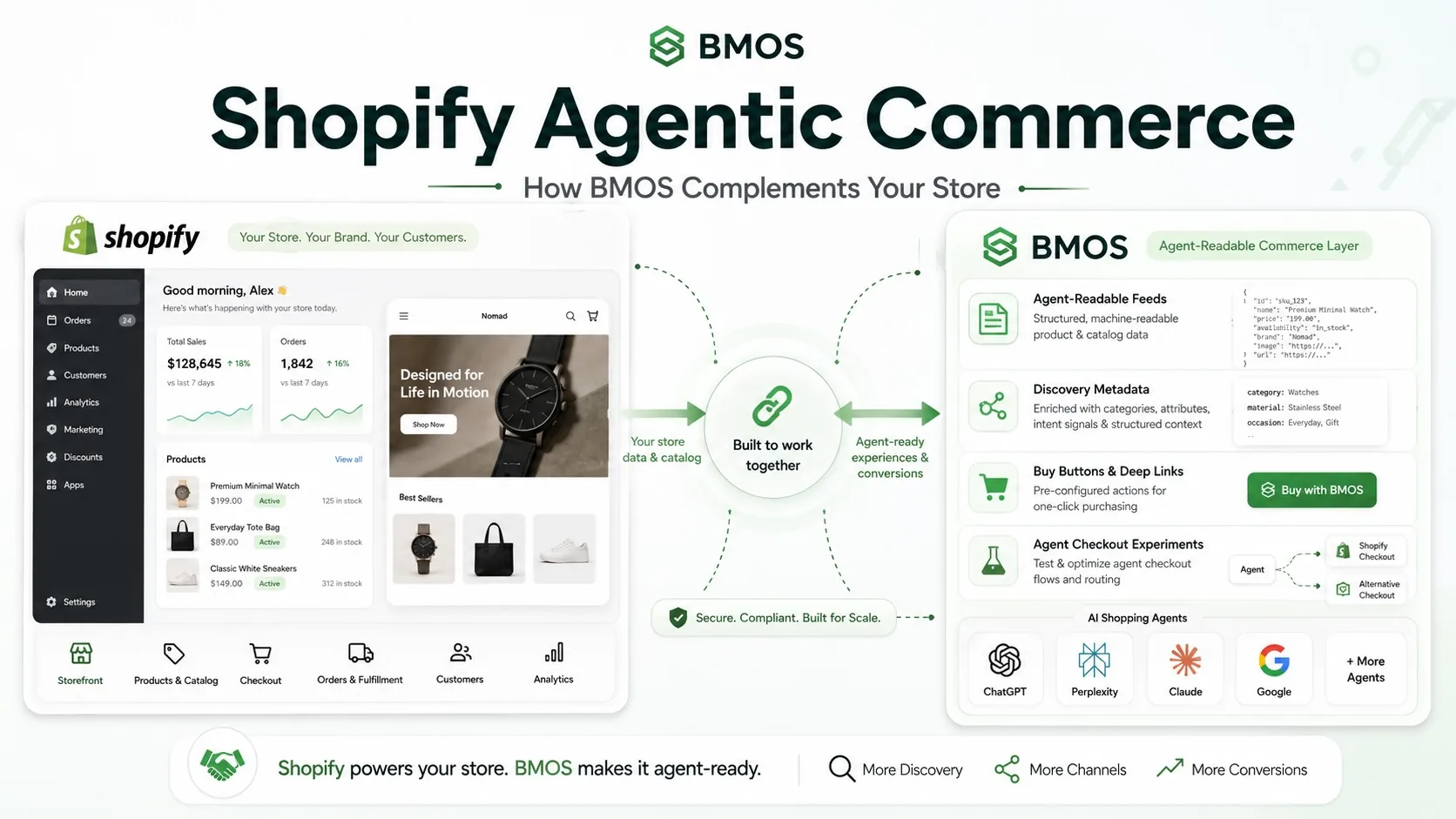
Shopify agentic commerce does not make BMOS a Shopify replacement. For most merchants, the strongest strategy is to keep Shopify as the human storefront, admin, checkout, order, and customer operations system, then add BMOS as an agent-readable catalog and discovery layer for the agentic web.
In plain English: Shopify runs the store. BMOS makes the store easier for compatible AI agents, buyer agents, technical marketers, and agency teams to inspect. That is why Shopify agentic commerce and BMOS should usually be positioned as complementary layers, not competing platforms.
BMOS works beside Shopify
BMOS is best understood as an add-on layer for merchants who already use Shopify. Your Shopify store can stay live, your checkout can stay in place, your products can remain managed through Shopify, and your existing fulfillment and support workflows can continue to operate as they do now.
BMOS adds a machine-readable commerce surface around that store. The BMOS Shopify integration strategy explains that merchants can use Shopify for the existing store, admin, and customer operations while using BMOS for AI discovery, structured product feeds, buy buttons, and agent checkout experiments. Read the BMOS reference here: BMOS works with Shopify.
What Shopify is building for agentic commerce
Shopify has made agentic commerce a major part of its platform roadmap. Shopify describes agentic commerce as AI agents helping shoppers discover, compare, and purchase products inside conversations. Its current offering includes Agentic Storefronts, Shopify Catalog, Universal Commerce Protocol support, AI channel syndication, checkout experiences, and developer tools for agents.
Shopify Agentic Storefronts are designed to help Shopify brands show up in AI conversations while keeping brand control, checkout, attribution, orders, and customer relationships inside Shopify. Shopify says merchants can toggle AI platforms on or off and use the Shopify Catalog to syndicate product data to AI chats.
Shopify's Universal Commerce Protocol work matters because it creates a shared language for commerce agents. UCP covers product discovery, checkout, orders, post-purchase workflows, capability negotiation, and payments. Shopify's developer documentation also describes MCP servers for catalog discovery, carts, checkout, and order monitoring.
That is important progress for merchants. It also creates a practical question: if Shopify is already investing in agentic commerce, why would a Shopify merchant add BMOS?
Your BMOS and Shopify stack
BMOS fits where merchants need a dedicated, inspectable, merchant-controlled catalog layer for the agentic web. It is not a theme migration. It is not a Shopify admin replacement. It is not a competing checkout promise. It is a structured commerce layer that can sit beside Shopify and make product data, policy context, checkout routes, and readiness signals easier for compatible agents to read.
The BMOS article What Is an Agent-Ready Product Catalog? defines an agent-ready catalog as a structured, current, machine-readable version of an ecommerce catalog that agents can discover, parse, compare, and use in commerce workflows. That is the job BMOS is built to handle.
For Shopify merchants, the practical setup is simple: keep Shopify as the primary storefront and operations system, then use BMOS to publish a companion agent-readable feed, organize product visibility, expose product and policy metadata, test prompts, and add optional buy buttons or machine checkout paths where appropriate.
Shopify and BMOS side by side
| Commerce layer | Shopify role | BMOS role |
|---|---|---|
| Human storefront | Primary ecommerce website, theme, product pages, cart, checkout, customer accounts, and merchant admin. | Optional store pages, embedded buy buttons, product widgets, or AI-built storefront surfaces that can point back to existing product URLs. |
| Product data | Often the merchant source system for products, variants, prices, inventory, images, and fulfillment workflows. | Normalizes product data into catalogs and storefront-specific visibility rules for feeds, buttons, and agentic checkout. |
| AI discovery | Supports AI commerce through Shopify Catalog, Agentic Storefronts, UCP, and Shopify's agent tools. | Publishes a BMOS agentic feed and site metadata so compatible tools can inspect structured product, merchant, and checkout information. |
| Checkout | Shopify Checkout remains the standard path for the Shopify store and Shopify-supported agentic channels. | Can support optional agent-optimized checkout experiments when the merchant enables BMOS machine checkout. |
| Operations | Orders, inventory, fulfillment, reporting, customer support, and back-office workflows remain centered in Shopify. | Separates feed discovery, button clicks, readiness testing, and agent checkout attempts from normal Shopify traffic. |
Why BMOS does not compete with Shopify
Shopify is the commerce operating system for many merchants. BMOS is a catalog, feed, metadata, and testing layer for agentic commerce readiness. Those are different jobs.
- BMOS does not require merchants to rebuild their Shopify theme.
- BMOS does not replace Shopify Admin, Shopify Checkout, Shop Pay, Shopify orders, or Shopify fulfillment workflows.
- BMOS does not ask merchants to turn off Shopify products just because certain products should be hidden from an agentic feed.
- BMOS does not promise guaranteed placement inside ChatGPT, Gemini, Claude, Copilot, or any other AI assistant.
- BMOS does give merchants another structured surface for compatible AI agents to inspect product data, policies, identity signals, and checkout routes.
Shopify can continue to power the storefront and Shopify-native agentic channels. BMOS can give the merchant a portable, inspectable, agent-readable catalog layer that can sit beside Shopify, WooCommerce, custom sites, distributor pages, and marketplace listings.
Why add BMOS if Shopify already has Agentic Storefronts?
A Shopify merchant may still want BMOS because agentic commerce is not just one channel. Products may need to be understandable across AI chats, search surfaces, buyer agents, custom internal tools, agencies, prompts, product feeds, and inspection workflows.
BMOS gives the merchant a practical layer for these jobs:
- Agent-readable product feeds: BMOS can publish structured catalog data that compatible agents can inspect without guessing from page layout.
- Storefront-level visibility: Merchants can choose which products belong in each BMOS storefront, feed, button set, or agentic store.
- Policy clarity: Shipping, returns, warranty, final-sale rules, restrictions, and support routes can be easier to expose as structured commerce context.
- Checkout experimentation: BMOS buy buttons and optional machine checkout routes let teams test new purchase paths without replacing the Shopify store.
- Agency workflows: Agencies can package catalog cleanup, BMOS feed setup, prompt testing, and readiness audits as a repeatable service.
- Cross-platform readiness: BMOS can sit beside Shopify and also work across non-Shopify catalog surfaces, which helps merchants with more complex stacks.
For a deeper operational guide, read Product Feed Optimization for AI Agents and The Merchant AI Visibility Checklist for Ecommerce.
The recommended Shopify plus BMOS data flow
A Shopify merchant does not need to launch everything at once. The safer path is gradual.
- Keep the Shopify store live as the main storefront and operations system.
- Audit product titles, descriptions, categories, variants, SKUs, prices, currency, inventory, images, shipping, returns, and checkout URLs.
- Import or mirror Shopify products into a BMOS catalog while preserving Shopify product IDs, variant IDs, SKUs, canonical product URLs, image URLs, price, currency, inventory, and fulfillment constraints.
- Choose which products should appear in each BMOS storefront, feed, button set, or agentic store.
- Publish the public BMOS agentic feed for the storefront.
- Link the BMOS feed from the Shopify theme, footer, product pages, or metadata so crawlers, LLM-connected tools, and buyer agents have a discoverable path.
- Use the BMOS SKILL.md guidance and prompt testing workflows to check whether agents can resolve the catalog, read product records, compare products, and find checkout paths.
- Add BMOS buy buttons or optional machine checkout only where the merchant wants a controlled experiment.
What product data should Shopify merchants clean first?
Agentic commerce rewards clean facts. Start with the data that a buyer agent needs before recommending a product.
- Clear product names that describe the item, not only internal brand language.
- Variant-level data for size, color, material, bundle, subscription, configuration, and sellable SKUs.
- Current price, currency, inventory, availability, and update timestamps.
- Stable product URLs, image URLs, and checkout URLs.
- Shipping regions, delivery estimates, restrictions, return windows, refund rules, warranty terms, and support routes.
- Identity and trust signals that make the merchant, catalog source, and support path easier to inspect.
The goal is not to make product copy robotic. Human product pages still need brand, photography, proof, education, and conversion copy. The BMOS layer simply gives compatible agents a cleaner source for product facts.
Where Shopify remains the source of truth
A responsible Shopify plus BMOS implementation should be clear about source systems. For many merchants, Shopify remains the source of truth for products, variants, prices, inventory, checkout, orders, customers, fulfillment, and support operations.
BMOS should preserve Shopify identifiers and canonical URLs so teams can trace catalog records back to the store. Agents should be routed toward current sellable variants rather than non-sellable parent product rows. If a merchant depends on Shopify for fulfillment and support, BMOS should support that reality instead of pretending the business has moved elsewhere.
Where BMOS becomes the agentic commerce layer
BMOS becomes useful when the merchant wants a dedicated surface for AI readability and testing. A product page may be visually persuasive, but an agent needs structured fields. A Shopify theme may be beautiful, but a buyer agent needs product constraints, availability, return rules, checkout routes, and freshness signals in a format it can inspect.
BMOS helps merchants and agencies answer questions such as:
- Can compatible agents discover the catalog source?
- Can agents parse product data without relying on screenshots or page design?
- Are variants, prices, policies, and checkout links represented consistently?
- Can the team test prompts against the catalog and identify gaps?
- Can the merchant publish agent-readable commerce data without rebuilding the whole Shopify store?
When Shopify alone may be enough
Some merchants may start with Shopify's built-in agentic commerce features and stop there. That can make sense if the catalog is simple, the merchant only wants Shopify-supported AI channels, the team does not need a separate feed strategy, and there is no agency or custom agent workflow to manage.
When Shopify plus BMOS makes more sense
Shopify plus BMOS makes more sense when the merchant wants more control over a companion agent-readable catalog, needs cross-platform or non-Shopify discovery surfaces, wants to run prompt tests, wants to expose structured policy metadata, or wants an agency-friendly readiness workflow.
It also makes sense for merchants who are not trying to pick one winner in agentic commerce. Shopify, Google, OpenAI, Microsoft, Perplexity, marketplaces, custom agents, and vertical shopping tools may all evolve differently. BMOS gives merchants a way to organize their catalog for the broader agentic web while Shopify continues to do what Shopify does best.
Next step: add an agent-readable layer without replacing Shopify
Shopify merchants do not need to choose between their store and the agentic web. Keep Shopify as the commerce foundation. Add BMOS as the structured catalog, feed, testing, and checkout experimentation layer that helps compatible agents understand what you sell.
Start with the BMOS Shopify reference, then publish a feed: Add BMOS beside Shopify.